RPTools Bard
73 articles
 Some windows users experienced a Null Point Exception (NPE) when closing MapTool 1.10.2. This release fixes that problem.
-
We found a few more spots where the webp images were problematic. This release fixes them in getImage and tblImage macros.
-
With any feature release, you’ll likely introduce a few bugs. MapTool 1.10.1 contains a fix for the size modifier in getTokenImage() and fixes an issue in the new Javascript functionality around returning numeric values rather than strings when appropriate.
-
This release offers some exciting new features including some long-awaited GIF support and a number of speed improvements. New features include: Significantly reduced startup time for MapTool with a large asset cache under Windows. User database with encrypted passwords and public key support for logging in to MapTool servers plus macro functions for accessing database. WebRTC supported for connecting to servers without using port-forwarding. More support for JavaScript through GraalVM-JS. Access HTML/CSS/JS content on lib:tokens via URI from dialogs/frames/overlays plus new macro functions to open dialogs/frames/overlays using URIs. GIF anim support in dialogs, frame5 and overlays. More performance improvements for Fog of War handling. New macro functions, bug fixes and localization translations.
 There was a bug regarding default overlays and a bug in the file-type selection for saving tokens that have been fixed as part of this release. Please see the TokenTool 2.2.0 release post for new features and updates.
-
TokenTool 2.2 features the following:
 Users discovered a few bugs in MapTool 1.9.2. This release fixes the following:
-
This is a bug release to fix a bug encountered when adding new folders to the Resource Library. It also contains an update to the Macro Editor Help to include many missing functions. Please refer to the MapTool 1.9.0 Release post for a full list of MapTool 1.9 features.
-
We have a new MapTool ready for download. Please report back any issues to either the forums or Discord.
 We have a new Beta build ready for you to download and test. As a reminder, this isn’t quite ready for game night but we’d appreciate you running your favorite framework through the build’s functionality and reporting back any issues to either the [forums][forums] or [Discord][discord].
-
For those of you who like to test, MapTool 1.9 Beta 2 is available for testing. Please note: this is not ready for game night. If you have questions about one of the functions below, open the Changelog and click on the link to the change in question. MapTool 1.9 features usability upgrades, software build improvements, better internationalization, and expanded image type support. #2550 Internally sent macro commands no longer added to Chat command history. #2524 Activating the experimental web app server shows a warning dialog and sends a warning to chat. #2519 Moved to GraalVM-JS engine from Nashorn. GraalVM provides an ECMAScript-compliant (ES11) runtime to execute JavaScript. #2494 Support added for WebP, SVG, ICO, TGA images. #2466 Drawings can not be selected with the mouse and deleted via the delete key. #2452 Additional UI elements added to fullscreen view #2366 Improved tooltips and error messages from Start Server dialog. #2360 Map view can now be panned with Ctrl + arrow keys. #2349 Shortcut keys added to flip token images. F for horizontal and Shift-F for vertical. #2234 New macro functions for drawing MBL: drawMBL(), eraseMBL(), getMBL(). #1496 Common Macros group now shows on Selected panel even when no macros are in common. #1420 HTML links in displayed token notes will now open the default browser. #1234 New macro function for retrieving Bar & State images: getBarImage() and getStateImage() #369 Dragging macro buttons now support both move and copy depending on source/destination and active modifier keys.
-
This is another bugfix release. 1.8.4 had a problem in that it removed the previous version of MapTool. 1.8.5 fixes that behavior as well as a few other bugs. The only enhancement in this release is Token Property highlighting in the macro editor.
-
This release fixes a number of bugs. Many thanks to all of the community developers who contribute so much and thanks to all of the users for their patience as we work through the rough spots. The community translators have also made good progress in their efforts so a round of applause for them as well.
-
We are pleased to announce a huge leap forward for MapTool. This release includes the ability to generate dynamic HTML5/CSS3 forms and dialogs as well as new transparent windows called overlays that allow you to interact with your custom UI without covering the map.
 RPTools products are open source gaming products. Being open source, they’ve had multiple contributors throughout the years with documentation, forum posts, and tutorials provided by our ever-growing community. At times the sheer volume of information can be off-putting.
-
This is an emergency release to fix a few issues that arose from 1.5.9. The fixes include Deleting multiple tokens was producing an oncurrentModificationException Issues with the German translation files broke many shortcuts and blocked the macro editor from opening if the German language was used.
-
Happy New Year to the RPTools Community. The MapTool elves did not take much of a break over the holidays and have produced MapTool 1.5.9. This release focused on clearing out bugs, both old and new, and bringing our software dependencies up to date. The release highlights are: Improvement to memory usage for campaigns with a large number of maps Multiple bug fixes More translation updates Multiple 3rd party libraries brought up their current version 20+ new or improved wiki pages by Melek and other volunteers This will be the last release that will install to Windows 98 or Vista. Going forward will require Windows 7 or higher for our Microsoft users
 The MapTool elves have been busy this holiday season. They’ve introduced two new macro functions to produce HTML5 dialogs and frames. The new macro functions frame5() and dialog5() can be used in place of the HTML3 frame() and dialog() macro functions.
 RPTools products are used worldwide and support 11 languages as of this writing. We’ve always relied on volunteers to provide translations for the menus, tooltips, and labels in MapTool and TokenTool. We’ve now made it easier to contribute by leveraging crowdin, a third-party translation site.
-
The MapTool elves have been busy providing even more holiday goodness. We are proud to announce MapTool 1.5.8 which brings improvements to existing functionality, new capabilities, as well as new and improved macro functions. MapTool versions from 1.5 onward are 64-bit OS only.
 MapTool framework developers often use HTML frames and dialogs for character sheets and other interactive displays utilizing the frame() and dialog() macro functions. However, it has often been challenging to see the actual HTML code generated by MapTool.
-
This release is a quick fix for the Null Pointer Exception (NPE) which caused MapTool to fail on Mac OS. It is otherwise the same as MapTool 1.5.5. Please see that post for new features and functions. MapTool versions from 1.5 onward are 64-bit OS only.

-
The RPTools elves have been hard at work bringing you new and wonderous functionality in MapTool. We are proud to announce MapTool 1.5.5 which brings improvements to existing functionality, new capabilities, as well as new and improved macro functions. MapTool versions from 1.5 onward are 64-bit OS only.
-
The RPTools staff is proud to announce the release of MapTool version 1.5.4. This release adds a great deal of new macro functionality and cleans up some long-standing bugs mostly thanks to the tireless efforts of the new contributor, Guillaume “Merudo” Filteau. MapTool versions from 1.5 onward are 64-bit OS only.
-
The RPTools staff is proud to announce the release of MapTool 1.5.2. You can find a complete changelog here. This version of 1.5 comes closer to becoming our Stable build for general use. Please download and run your frameworks through it to make sure everything is still working as expected. MapTool versions from 1.5 onward are 64-bit OS only.
 This information applies to MapTool v1.7.0 and prior. Note that these versions are no longer supported and should not be used. This information does not apply to later releases
 RPTools is an international community. We see this on the social sites as well as in our developer group. There are also several native language support sites. Translating the text in MapTool is one of the many ways we support each other.
 This will begin a series of articles on GitHub to help our community better understand what goes into the production of MapTool and TokenTool and how to us it to check on your favorite open source project.
 It is with a heavy heart that we inform our beloved community that two of our most prolific contributors are moving on to their next adventure.
-
The RPTools staff is proud to announce the release of TokenTool 2.1. Many thanks to @jamz for all his hard work on this release.
-
DPI scaling may affect your MapTool experience in odd ways. We’ve previously discussed the effect on the readability of MapTool text as well as a workaround to fix it.
 This is part two of a 2011 interview done at the end of MapTool 1.3 development. It’s a fun article to read again after all these years. We’ve accomplished a great deal of the 1.4 plans but had to delay some of the hopes due to JavaFX becoming a technical football at Oracle. We hope things have settled down with Oracle giving JavaFX to the Open JDK group.
-
This interview was done in 2011 at the end of MapTool 1.3 development. It’s a fun article to read again after all these years. We’ve accomplished a great deal of the 1.4 plans but had to delay some of the hopes due to JavaFX becoming a technical football at Oracle. We hope things have settled down with Oracle giving JavaFX to the Open JDK group.
 R. K. Athey, aka RPTroll, is the RPTools Bard and a member of the RPTools Staff. As Bard, RPTroll manages the social media sites for RPTools as well as other marketing tasks, such as interviews. He’s also responsible for managing and providing content to the rptools.net site.
 Craig ‘no avatar’ Wisniewski is a current member of the RPTools staff and its lead developer. Craig writes most of the design documents we use behind the scenes to determine how features will work within MapTool and is active in release automation and release management. He’s one of the primary review gates for new code coming into the tools.
 Bill Hart, aka Dorpond, is a member of the RPTools staff who provides guidance and support for new features in MapTool. While not as active as he once was, he still supports us as needed.
-
We interrupt our Blast from the Past series to bring you a fix to a potentially irritating problem plaguing Windows 10 users.
-
As part of the 1.5.0 release, MapTool included a popup window to allow for multiple-line editing of properties. Prior to this release, you would need to copy a long properties entry to another editor, make your changes, then copy it back. With 1.5, you can simply click into the properties field, then on the down arrow next to the property value to bring up an editing window.
-
The RPTools Staff and Community are proud to announce the release of MapTool 1.5.1. This release contains bug fixes as well as a few functional bits that didn’t make it into 1.5.0. You can find the full 1.5.1 Changelog on our GitHub site.
 Frank Edwards, aka Azhrei, is one of the RPTools staff who does the hero’s work website upkeep. He’s also heavily involved in the current GitHub automation and past build automation. Perhaps most importantly to the end-user community, he serves as the main review gate/sanity check for new code and concepts entering into RPTools products.
 Trevor Croft was the original developer for MapTool. He’s listed as Coder Emeritus in the credits and is one of the 3 founders of RPTools. Trevor left active development at RPTools to concentrate on family and career. He, more than any other person, made the beginning days of RPTool a success.
 The spacebar in MapTool has several features that GMs find useful during games.
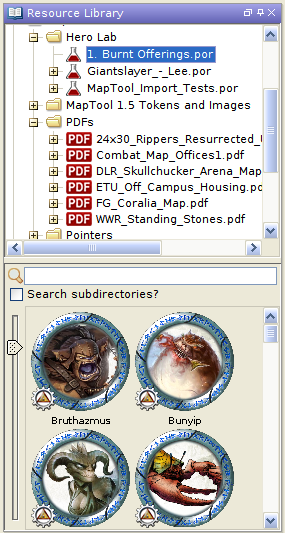 MapTool 1.5 and greater now support PDFs and Hero Lab POR files as part of the Resource Library. You can either place the files in an existing file folder in the LIbrary or add a new folder via the File->Add Resource Library menu.
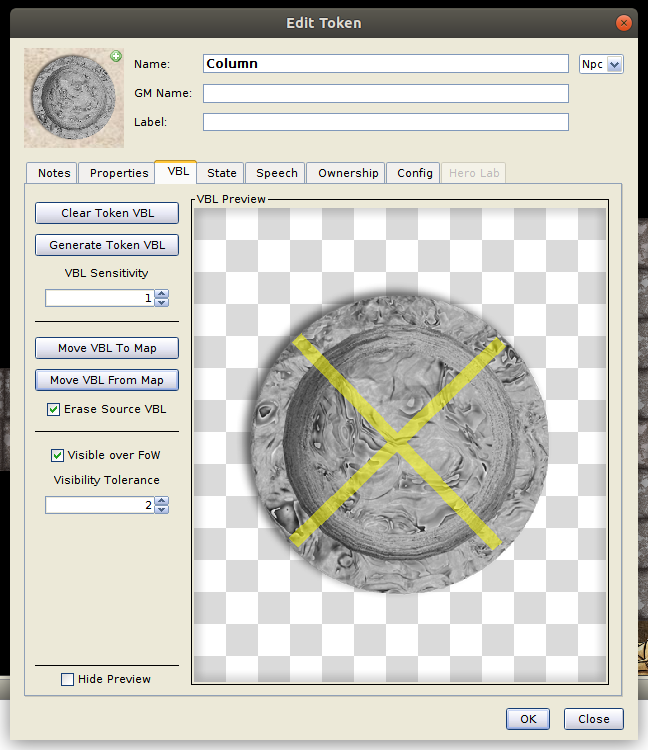 MapTool 1.5 allows the transfer Vision Blocking Layer (VBL) to and from tokens. To access this new capability, simply edit a token and go to the VBL tab.
 New in version 1.5: Pathfinding.
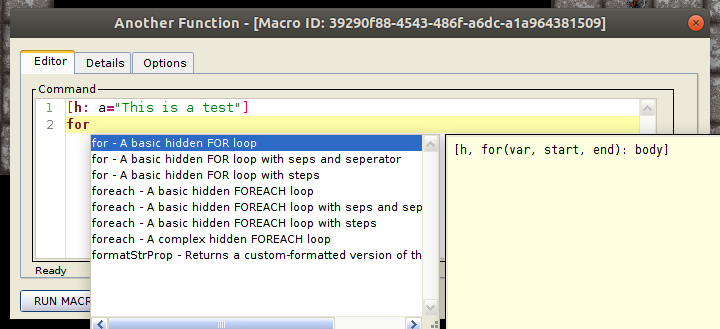 With the release of MapTool 1.5 comes a new macro editor with syntax highlighting and code completion. You no longer need to close the editor to run a macro or save changes. The new editor features:
 MapTool 1.5 now comes bundled with Java so there’ll be no more struggling with Java versions or Java upgrades. You also don’t go through a launcher. Those settings have moved to the Edit->Preferences->Startup tab.
-
The RPTools team is proud to announce the release of MapTool 1.5 which includes a number of new features to make your in-game RPG experience better from campaign design to game night. The Github changelog contains a complete list of changes.
 Devin Night has gamed since the early 80’s and is a long-time supporter of RPTools with content in multiple MapTool art packs to his credit. Devin is best known for his overhead tokens which, outside of MapTool art packs, you can find his token site. He can also create customer tokens at reasonable rates in case you roll your own universes or need a specific character token.
-
RPTools is proud to announce a new version of TokenTool, Rewritten in JavaFX to bring a modern and updated UI as well as a few new features! TokenTool 2.0 now supports PSD format for ‘overlays’ to allow for better masking by supporting ‘layers’. To create your own ‘overlay’ you can use any version of PhotoShop or GIMP and add your masking layer as the first (bottom) layer and your overlay image as the second (top) layer.
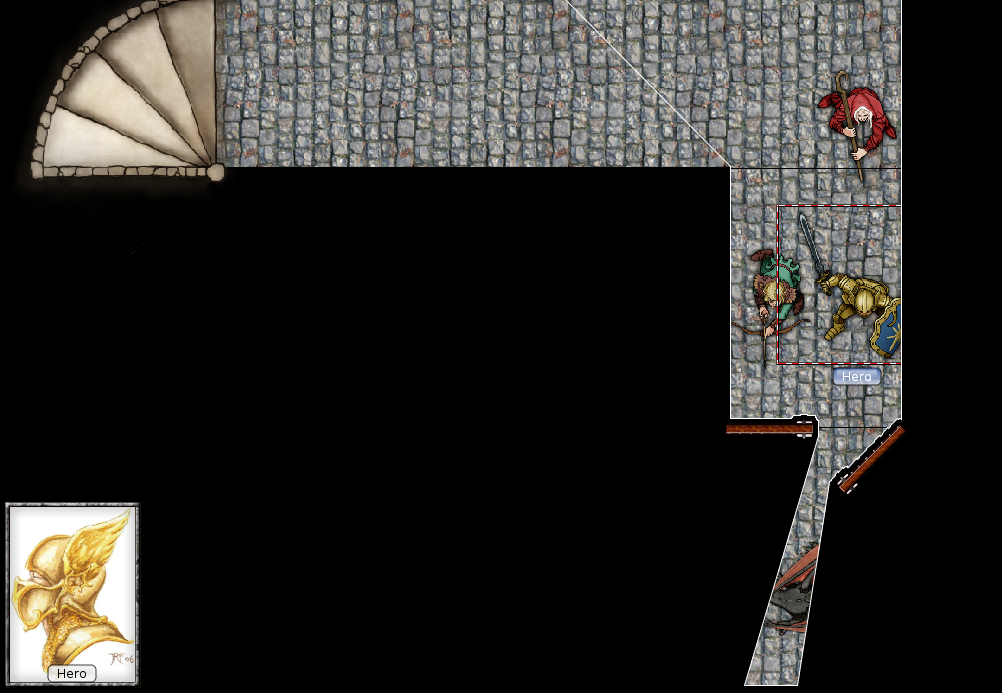 Long time users of MapTool know the problem with doors, columns, statues, and Vision Blocking Layer (VBL). You want MapTool to block vision through these objects but you want the players to see them without their vision being blocked by VBL. Thanks to the RPTools craftsmen, you can now have your object and VBL too.
 We’re experimenting with a new distribution method by allowing users the ability to download MapTool from DriveThruRPG for free with an optional donation. This is in addition to our traditional Download Page – not a replacement for it. Opening the DriveThruRPG channel does a few things for us.
 Devin Night is a freelance artist/illustrator and a long time friend to RPTools. He kindly donated art packs available for download in MapTool. Outside of MapTool, you’ve likely seen his work in products from Rite Publishing, Grey Matter Games, White Haired Man, and many others.
-
Community member Bhoritz found some great parchment-style maps by Gogots on Deviantart. The artist also provides all the mapping elements to make your own. Gogots gives the authorization to use the maps and elements to post or publish for non-commercial products. There is an associated YouTube channel with explanations on how to use the resources (if you read French). However, the explanations aren’t really needed since the map building is just copy/paste in either Photoshop or Gimp. Below is an example of what you can create.
-
One of the strengths of RPTools is the community of users who take the time to make life easier for others. Another strength of MapTool is its incredible flexibility and the vast number of options open to a gamemaster. However, that flexibility comes at the cost of a learning curve that may seem daunting. We are fortunate to have community members like Thomas Chapman who take the time to produce tutorials which demonstrate the functionality and best practices for MapTool use and adoption.
-
MapTool 1.4.1.8 is available for download from [rptools.net][maptool-toolbox] by clicking on the Download link in the top toolbar.
-
One of the strengths of MapTool is its community. Case in point, Thomas Chapman who took the time to create a series of MapTool tutorials. Thanks, Thomas. We salute you.
-
With the upcoming release of MapTool 1.4.2, GMs will be able to add a layer of Vision Blocking to stamps and tokens. This means Players will be able to see an object but that object will block all light and sight from passing through it. This comes in handy for doors, statues, vehicles, and large tokens. When combined with MapTools Macro Bag of Tricks drop-in resource, you can create the following effect on doors.
 The last (hopefully) Dev/Test version in the 1.4.1 series is now available for download from https://maptool.craigs-stuff.net/test-builds/. The 1.4.1 series saw a large number of major changes which will now be rolled into the forthcoming 1.4.2 production release. We’ll only release a 1.4.1.7 if more testing is required.
-
The RPTools craftsmen produced a new Dev/Test MapTool version for you to try. Adventurous GMs should consider trying it in one of your games but be very sure to save a backup copy of your campaign first. There will likely be one more Dev/Test release before we increment to 1.4.2.0 so please take some time to try this version so we can catch as many bugs as possible before we release it into the gaming wilds.
-
This release corrects a few small bugs affecting isometric map ‘figure’ stamps along with a fix for Draw Tool images. This is likely the last version of the 1.4.0.x series and represents our latest production release. Please upgrade as soon as practical.
-
With the release of Maptool 1.4.2 you will have the ability to get a drawing’s properties and apply those to another drawing. You can try this functionality in the Dev/Test Build of MapTool now but we don’t recommend using Dev/Test for your gaming sessions unless you’re the adventurous sort.
-
Warning: This Build Could Blow Up!
-
Time for another build with bug fixes and some features
-
We are pleased to announce the release of MapTool 1.4.0.3, now available from the [Download][maptool-toolbox] page.
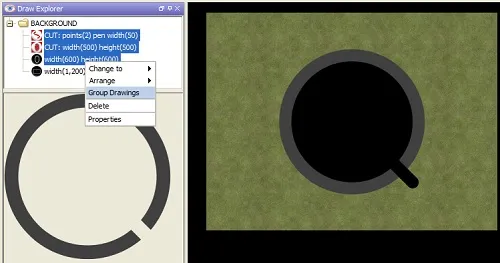 MapTool added the Draw Explorer as a new feature in release 1.4.0.1. This innovation gives GMs access to a tree view of drawings and templates on the current map. From this view, users see a list of elements created with the Drawing and Template Tools. Note: for the purposes of this article, both templates and drawings will simply be called drawings.
-
This was a quick release to fix the tableImage() image issue which surfaced in MapTool build 1.4.0.1. This release also adds capabilities to modify the max recursion depth in function calls.
-
Great news everyone. There’s a new version of MapTool available from the [download page][maptool-toolbox] of rptools.net. The most exciting features of Build 1.4.0.1 includes some new functionality that will make drawing maps easier and new MapTool Table functions that effectively allow for global variables and image stores without resorting to dropping new tokens on a map. Look for posts regarding this new functionality soon™.
-
We’re proud to announce the release of MapTool 1.4.0, creating a revitalization of MapTool development methodologies and direction. The MapTool application began life in 2005 when three programmers started an open source Java project as a way to connect remote friends for their RPG. It has grown in features and functionality over the last decade to include capabilities suggested by and implemented by its users but retains the goal of bringing gamers together. MapTool will always be free and supported by people that love RPGs and willingly give back to the gaming community.
-
MTScript is a custom language for writing MapTool macros which grew out of MapTool’s chat functionality. It began simply enough as a way to roll dice. It expanded over time to the point where users create custom gaming frameworks and convenience functions in MapTool to be used by GMs and Players alike. To get a hint of what mtScript can do, check out the User Creations topic in the MapTool forum. To see MTScript taken to the Nth degree see Wolph42’s Bag of Tricks which encapsulates extreme MTScripting. You’ll find support for complete RPG frameworks for a huge number of games systems in Campaign Frameworks.
-
Welcome to RPTools new website. We hope you find the new site cleaner, slicker, and easier to navigate. We’ve added a group of quick links to the sidebar and reorganized the pages a bit including links to the [forums][forums], [Wiki][wiki], user-created frameworks, online communities, and other helpful links to get new users started. We hope you find it more user friendly.
-
This build features a number of bug fixes, new VBL functionality, a new Java launcher, and Java 8 support (hellya). The new release is located on our [download][maptool-toolbox] page or you can launch it directly from the web launch page. Note that Oracle now has quite a few security warnings around web launch programs. You can find a complete list of updates on the announcements page.