 RPTools.net
Posts from 2019
36 articles
 The MapTool elves have been busy this holiday season. They’ve introduced two new macro functions to produce HTML5 dialogs and frames. The new macro functions frame5() and dialog5() can be used in place of the HTML3 frame() and dialog() macro functions.
 RPTools products are used worldwide and support 11 languages as of this writing. We’ve always relied on volunteers to provide translations for the menus, tooltips, and labels in MapTool and TokenTool. We’ve now made it easier to contribute by leveraging crowdin, a third-party translation site.
 The MapTool elves have been busy providing even more holiday goodness. We are proud to announce MapTool 1.5.8 which brings improvements to existing functionality, new capabilities, as well as new and improved macro functions. MapTool versions from 1.5 onward are 64-bit OS only.
-
The RPTools elves have been hard at work bringing you new and wonderous functionality in MapTool. We are proud to announce MapTool 1.5.7 which brings improvements to existing functionality, new capabilities, as well as new and improved macro functions. MapTool versions from 1.5 onward are 64-bit OS only.
 MapTool framework developers often use HTML frames and dialogs for character sheets and other interactive displays utilizing the frame() and dialog() macro functions. However, it has often been challenging to see the actual HTML code generated by MapTool.
-
This release is a quick fix for the Null Pointer Exception (NPE) which caused MapTool to fail on Mac OS. It is otherwise the same as MapTool 1.5.5. Please see that post for new features and functions. MapTool versions from 1.5 onward are 64-bit OS only.

-
The RPTools elves have been hard at work bringing you new and wonderous functionality in MapTool. We are proud to announce MapTool 1.5.5 which brings improvements to existing functionality, new capabilities, as well as new and improved macro functions. MapTool versions from 1.5 onward are 64-bit OS only.
-
The RPTools staff is proud to announce the release of MapTool version 1.5.4. This release adds a great deal of new macro functionality and cleans up some long-standing bugs mostly thanks to the tireless efforts of the new contributor, Guillaume “Merudo” Filteau. MapTool versions from 1.5 onward are 64-bit OS only.
-
The RPTools staff is proud to announce the release of MapTool 1.5.3. You can find a complete changelog here. This version of 1.5 comes closer to becoming our Stable build for general use. Please download and run your frameworks through it to make sure everything is still working as expected. MapTool versions from 1.5 onward are 64-bit OS only.
-
The RPTools staff is proud to announce the release of MapTool 1.5.2. You can find a complete changelog here. This version of 1.5 comes closer to becoming our Stable build for general use. Please download and run your frameworks through it to make sure everything is still working as expected. MapTool versions from 1.5 onward are 64-bit OS only.
 This information applies to MapTool v1.7.0 and prior. Note that these versions are no longer supported and should not be used. This information does not apply to later releases
 RPTools is an international community. We see this on the social sites as well as in our developer group. There are also several native language support sites. Translating the text in MapTool is one of the many ways we support each other.
 This will begin a series of articles on GitHub to help our community better understand what goes into the production of MapTool and TokenTool and how to us it to check on your favorite open source project.
 It is with a heavy heart that we inform our beloved community that two of our most prolific contributors are moving on to their next adventure.
 The RPTools staff is proud to announce the release of TokenTool 2.1. Many thanks to @jamz for all his hard work on this release.
 DPI scaling may affect your MapTool experience in odd ways. We’ve previously discussed the effect on the readability of MapTool text as well as a workaround to fix it.
 This is part two of a 2011 interview done at the end of MapTool 1.3 development. It’s a fun article to read again after all these years. We’ve accomplished a great deal of the 1.4 plans but had to delay some of the hopes due to JavaFX becoming a technical football at Oracle. We hope things have settled down with Oracle giving JavaFX to the Open JDK group.
-
This interview was done in 2011 at the end of MapTool 1.3 development. It’s a fun article to read again after all these years. We’ve accomplished a great deal of the 1.4 plans but had to delay some of the hopes due to JavaFX becoming a technical football at Oracle. We hope things have settled down with Oracle giving JavaFX to the Open JDK group.
 R. K. Athey, aka RPTroll, is the RPTools Bard and a member of the RPTools Staff. As Bard, RPTroll manages the social media sites for RPTools as well as other marketing tasks, such as interviews. He’s also responsible for managing and providing content to the rptools.net site.
 Craig ‘no avatar’ Wisniewski is a current member of the RPTools staff and its lead developer. Craig writes most of the design documents we use behind the scenes to determine how features will work within MapTool and is active in release automation and release management. He’s one of the primary review gates for new code coming into the tools.
 Bill Hart, aka Dorpond, is a member of the RPTools staff who provides guidance and support for new features in MapTool. While not as active as he once was, he still supports us as needed.
-
We interrupt our Blast from the Past series to bring you a fix to a potentially irritating problem plaguing Windows 10 users.
-
As part of the 1.5.0 release, MapTool included a popup window to allow for multiple-line editing of properties. Prior to this release, you would need to copy a long properties entry to another editor, make your changes, then copy it back. With 1.5, you can simply click into the properties field, then on the down arrow next to the property value to bring up an editing window.
-
The RPTools Staff and Community are proud to announce the release of MapTool 1.5.1. This release contains bug fixes as well as a few functional bits that didn’t make it into 1.5.0. You can find the full 1.5.1 Changelog on our GitHub site.
 Frank Edwards, aka Azhrei, is one of the RPTools staff who does the hero’s work website upkeep. He’s also heavily involved in the current GitHub automation and past build automation. Perhaps most importantly to the end-user community, he serves as the main review gate/sanity check for new code and concepts entering into RPTools products.
 Trevor Croft was the original developer for MapTool. He’s listed as Coder Emeritus in the credits and is one of the 3 founders of RPTools. Trevor left active development at RPTools to concentrate on family and career. He, more than any other person, made the beginning days of RPTool a success.
 The spacebar in MapTool has several features that GMs find useful during games.
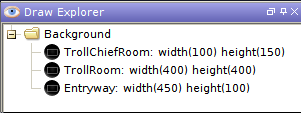 With the release of Maptool 1.5 comes a much-requested feature to the Draw Explorer. You can name drawings or groups of drawings via the Draw Explorer interface. This might not sound like much, but it greatly helps you navigate your way those around large, complex maps.
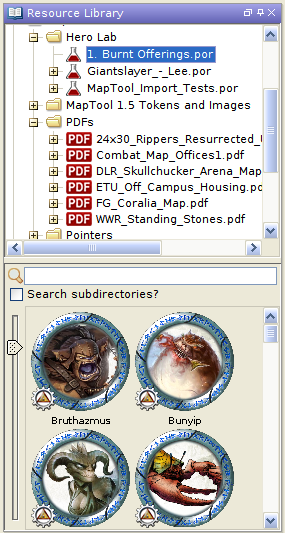 MapTool 1.5 and greater now support PDFs and Hero Lab POR files as part of the Resource Library. You can either place the files in an existing file folder in the LIbrary or add a new folder via the File->Add Resource Library menu.
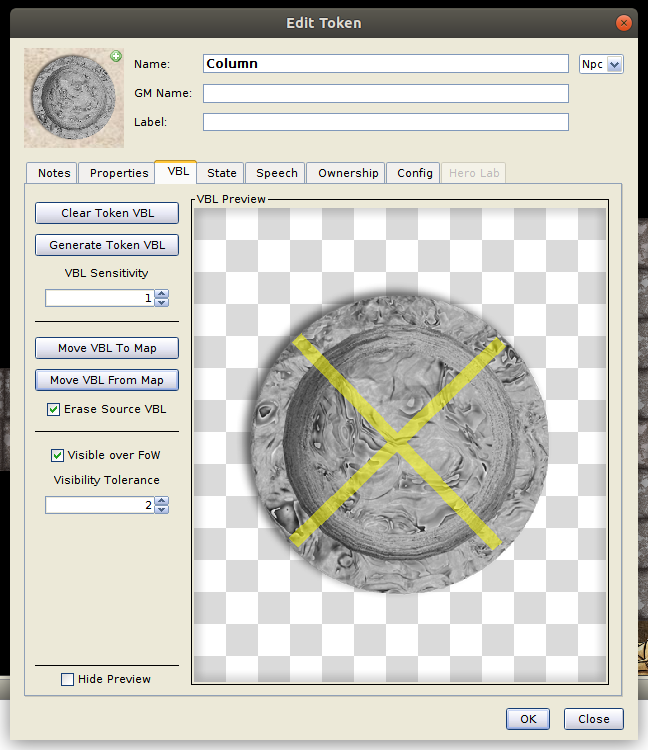 MapTool 1.5 allows the transfer Vision Blocking Layer (VBL) to and from tokens. To access this new capability, simply edit a token and go to the VBL tab.
 New in version 1.5: Pathfinding.
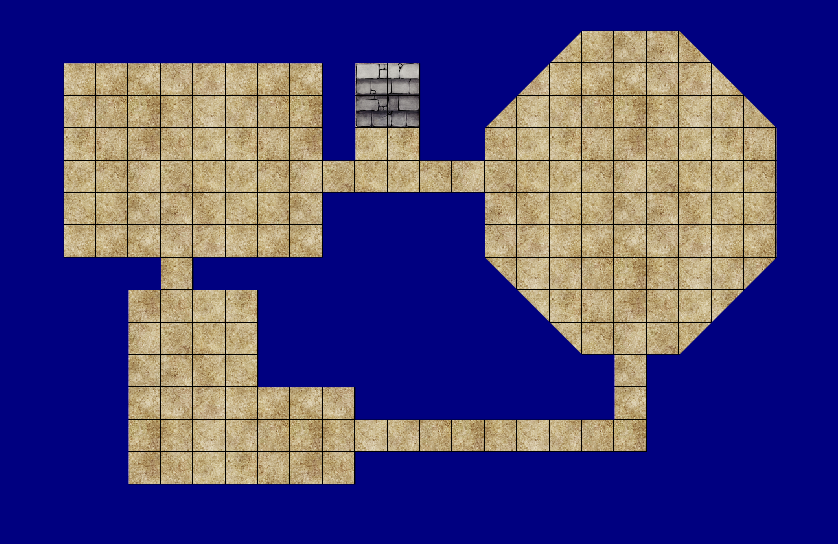 With the introduction of Maptool 1.5 comes a series of additions to the Draw Explorer that should speed map creation. If you draw your dungeon rooms directly in Maptool, you can now build the Vision Blocker Layer in a few simple clicks. Imagine you had built the dungeon shown below entirely with textures (not images):
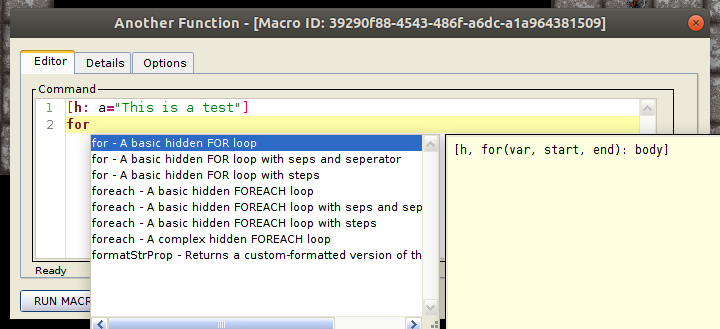 With the release of MapTool 1.5 comes a new macro editor with syntax highlighting and code completion. You no longer need to close the editor to run a macro or save changes. The new editor features:
 MapTool 1.5 now comes bundled with Java so there’ll be no more struggling with Java versions or Java upgrades. You also don’t go through a launcher. Those settings have moved to the Edit->Preferences->Startup tab.
 The RPTools team is proud to announce the release of MapTool 1.5 which includes a number of new features to make your in-game RPG experience better from campaign design to game night. The Github changelog contains a complete list of changes.